
The Difference Between Japanese Layout and JIS Layout on Keyboards for Mac
The layout of Mac-specific keyboards is a bit different from keyboards for Windows. Even among Mac keyboards, the Japanese layout and JIS layout have different arrangements.
Modified at: 2025.7.16Posted at: 2022.7.12
The Basics Are Japanese Layout (JIS) and US Layout
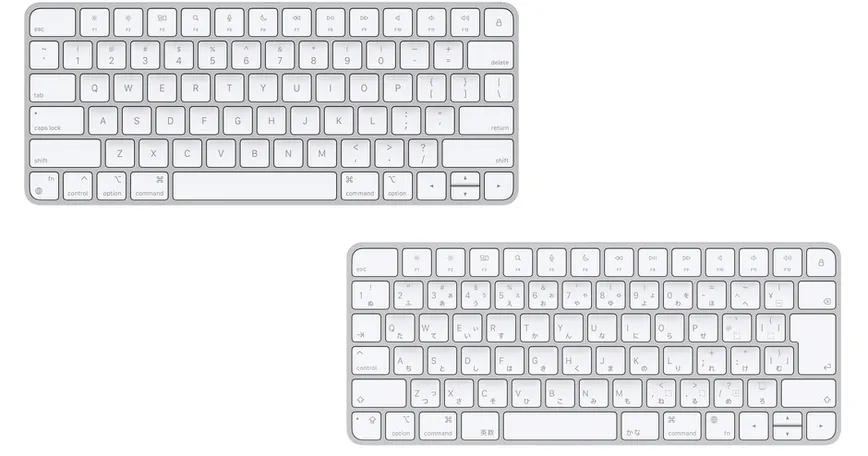
The layout of keyboards for Mac is different from Windows, but the base is still the Japanese layout (JIS) and the US layout. The biggest difference on the keys is the shape and size of the return key: the Japanese layout uses two horizontal rows to make a "vertical" enter key, and the US layout uses two vertical rows to make a "wide horizontal" key. Also, depending on the presence of special keys described later, the width of the space bar is also different.
The Biggest Difference Is the "Kana" and "Eisu" Keys
The biggest difference between the Japanese layout and US layout for Mac-only keyboards is the existence of the "Kana" and "Eisu" keys. In the Japanese layout, the "Kana" and "Eisu" keys, which correspond to the "Hankaku" key in Windows, are located to the left and right of the space key. These keys don't exist on the US layout, nor do they exist even on Japanese layout keyboards for Windows—they are special to the Mac layout.
The Layout of Ctrl, Capslock, Fn, and Option Also Differs
At first glance, it's not easy to notice, but even among Mac layout keyboards, the positions of certain keys are different. These are the Ctrl, Capslock, Fn, and Option keys.
| Key | Japanese Layout | US Layout |
|---|---|---|
| Ctrl | Third from the top, far-left column | Second from the left, bottom row |
| Capslock | First from the left, bottom row | Third from the top, far-left column |
| Fn | Left of the arrow keys | First from the left, bottom row |
| Option | Second from the top, far-left column | Left of the arrow keys, third from the left, bottom row |
Based on the Japanese layout, the differences for the Mac US layout are:
- Capslock is where Ctrl is in the Japanese layout
- Fn is where Capslock is in the Japanese layout
- Ctrl is where Option is in the Japanese layout
- Option is on both sides
Also, the key sizes are smaller for the Japanese layout. If you frequently use these keys, be aware that the positions and typing feel will greatly change.
The Center Position Is Different
This is also similar to the general difference between Japanese and US layouts, but the center position is quite different. The Japanese layout center is about 1cm more to the left. Since the positions of function keys like Command and Ctrl are not that different between Japanese and US layouts, it may feel like the "whole thing is offset."