
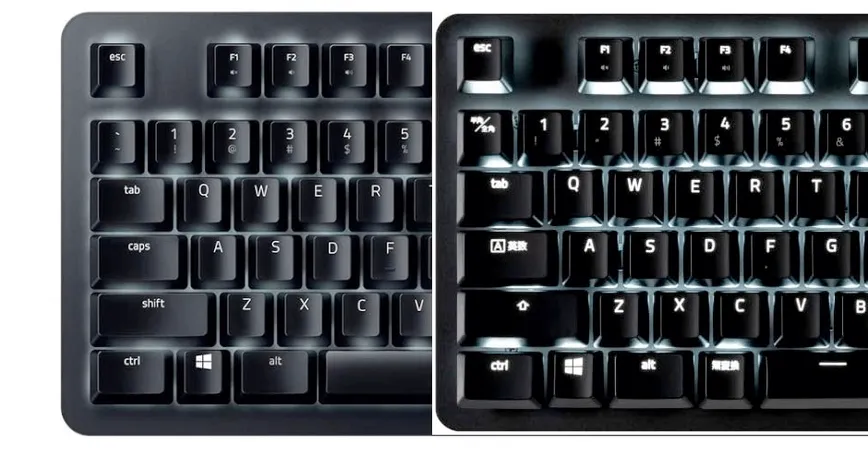
Differences Between US Layout Keyboards and Japanese Layouts
At first glance, the difference between US layout keyboards and Japanese layouts may seem to be only the size of the Enter key. However, there are actually significant differences in use that could be said to make them completely different.
Modified at: 2025.7.17Posted at: 2022.7.12
Alphabet Keys are the Same
The only keys that are the same between the Japanese layout and the US layout are the "alphabet keys." The arrangement of these keys is identical in both layouts, so if you only use the alphabet keys, usability is almost the same.
However, it is only "almost the same" because there is a difference in the center position.
The Center Position is Different
It is often difficult to notice just by looking, but actually, the center position differs between the Japanese and US layouts.
On the US layout, the fifth key from the left is the center for the left hand (F key), and the sixth key from the right is the center for the right hand (J key), whereas on the Japanese layout, the fifth key from the left is the left hand center, but the seventh key from the right is the right hand center. The Japanese layout is shifted one key to the left.
Since there is only the G key between the F key and the J key even on the Japanese layout, the center in the Japanese layout is shifted about one key to the left. As a result, the keys in the leftmost column become slightly smaller.
The Location of Special Keys is Different
This is a major issue for people who use special keys frequently, such as programmers.
While both the Japanese and US layouts have the special keys roughly near the same spots, the following keys are located very differently:
- @
- ~
- _
- ^
In particular, the _ key and the + key are located in completely different places, and since they are often used in programming, switching layouts can be confusing.
As a result of this difference, the numeric row key layout may also differ.
For example, the US layout for Macs has the tilde key at the start of the number row, but the Japanese layout number row starts from 1, so the numbers are shifted left by one key. In the case of Windows, there is the "half-width/full-width key" in the number row, so the number row layout is almost the same.
Arrangement of Special Symbol Keys Above Number Keys
A subtle but significant difference is the arrangement of special symbol keys used with Shift above the number keys.
| Number Key | Japanese Layout | US Layout |
|---|---|---|
| 1 | ! | ! |
| 2 | " | @ |
| 3 | # | # |
| 4 | $ | $ |
| 5 | % | % |
| 6 | & | ^ |
| 7 | ' | & |
| 8 | ( | * |
| 9 | ) | ( |
| 0 | None | ) |
The difference is with the 2 key and from the 6 key onward; after the 6 key, from the Japanese layout’s perspective, the keys shift one space to the right. Also, the space between the 0 key and the backspace key is usually two in the US layout, but three in the Japanese layout.
If you use these keys frequently, not only will the keys you need to press change, but the finger movement will also change (from the perspective of the Japanese layout, the US layout is shifted to the left), so usability changes significantly.
Presence or Absence of Japanese-Specific Keys
This is the most noticeable layout difference between the Japanese and US layouts. The Japanese-specific keys differ slightly depending on whether the keyboard is for Windows or macOS.
Japanese-specific keys include:
- Half-width/Full-width key (Windows)
- Muhenkan key (Windows)
- Henkan key (Windows)
- Katakana/Hiragana key (Windows)
- Kana key (Mac)
- Eisu key (Mac)
These keys are not found on layouts other than the Japanese layout.
If you use these keys frequently, you will need to assign their functions through key mapping in your OS.